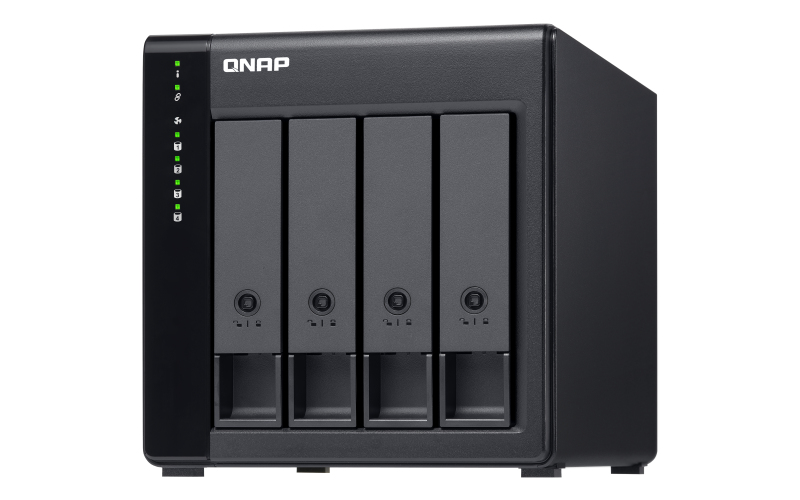
QNAP TL-D400S - Tower - 4 bays - 2.5"/3.5" SATA 6 Gbps
4x 2.5/3.5" SATA - 1x SFF-8088 - 168.5x160.2x219 mm
Brand: QNAP
SKU: TL-D400S
AED1,759.56
Price excl. VAT
AED2,111.47
Price incl. VAT
Available – In Stock

Do you have any question about this product? Click here to contact our pre-sales consultant and make the right purchase.
تسوّق بثقة: مخزون حقيقي وشروط تجارة عادلة
أسعار أفضل مع توفّر دقيق للمخزون، ومدفوعات آمنة بشفافية كاملة.
- مخزون مباشر مجمّع: التوفّر المعروض هو إجمالي المخزون المجمّع لمستودعاتنا وموزّعينا الشركاء، ويتم تحديثه لحظة بلحظة. إذا كان المنتج متوفراً، فهو متوفر فعلاً.
- لا خصم قبل التأكيد: يتم حجز المبلغ فقط عند إتمام الطلب، ولا يُخصم إلا بعد تأمين المنتج لك.
- إلغاء مجاني خلال 24 ساعة: غيّرت رأيك؟ ألغِ طلبك خلال 24 ساعة وسيتم فك حجز المبلغ بالكامل.
- نفد المخزون؟ استرداد كامل: إذا أصبح المنتج غير متوفر بعد طلبك، سنلغي الطلب ونفك حجز مبلغك أو نستردّه بنسبة 100%.
- توصيل إلى باب بيتك في الإمارات: يتم فحص كل طلب وتغليفه في مستودعاتنا وشحنه عبر DHL Express أو UPS أو FedEx بنظام DDP – دون أي رسوم جمركية أو ضرائب عليك. لا رسوم خفية.
- شروط عادلة للإلغاء والإرجاع: في حال الإلغاء المتأخر أو إرجاع المنتجات الغالية أو المطلوبة خصيصاً دون وجود عيب، قد تُطبَّق رسوم تتراوح بين 5% و10%، تغطي فقط تكاليف الشحن والمناولة الفعلية حتى نتمكن من الاستمرار. لا تُفرض أي رسوم على المنتجات المعيبة وحالات الإرجاع للضمان (RMA). لا رسوم تأخير في السداد ولا فوائد إطلاقاً. الشروط الكاملة
 NOTE: The information below is provided for your convenience only; the accuracy of the specifications cannot be guaranteed. However, if necessary, please check with us before purchasing. Data provided by 1 World Sync.
General
Product type
HDD/SSD enclosure
Number of storage drives supported
4
Storage drive size
2.5/3.5 "
Supported storage drive interfaces
Serial ATA II,Serial ATA III
Data transfer rate
6 Gbit/s
Hot-swap
Y
Product colour
Black,Grey
QNAP TL-D400S. Product type: HDD/SSD enclosure. Number of storage drives supported: 4, Storage drive size: 2.5/3.5", Supported storage drive interfaces: Serial ATA II,Serial ATA III. Data transfer rate: 6 Gbit/s. Hot-swap. Product colour: Black,Grey
| Estimate Gross Weight | 3.66 |
|---|
https://www.qnap.com/en/product/tl-d400s
TL-D400S JBOD storage enclosure allows you to back up and expand your QNAP NAS, Windows and Ubuntu computers and servers. The TL-D400S features four 3.5-inch SATA 6Gb/s drive bays and comes with a QXP PCIe card for connecting the enclosure using a SFF-8088 (or SFF-8644) cable. It provides reliable read/write performance for smooth storage and backup tasks.
High-performing TL SATA JBOD
The TL SATA JBOD supports multi-lane SATA 6Gb/s transfer, and each SATA lane directly connects to a single SATA drive to help improve performance. With the 1-1 high-speed channel, the TL SATA JBOD delivers excellent transfer performance.
Flexible Storage Configuration and Management
The TL-D400S provides software-controlled storage configuration for greater management flexibility. You can configure RAID and monitor JBOD enclosure and disk health with Storage & Snapshots when connected to a QTS or QTS hero NAS, or with the QNAP JBOD Manager utility when connected to a computer.
What you need to know
You can connect your TL-D400S to Windows® and Ubuntu® computers through SFF-8088 (or SFF-8644) high-speed cable and use built-in utility to manage RAID configuration.
Intelligently Monitor JBOD Enclosure Status on PC and Servers with QNAP JBOD Manager
The QNAP JBOD Manager is a desktop utility for monitoring the TL-D400S on Windows and Ubuntu computers. You can quickly obtain the disk statuses, JBOD information and health, view fan rotation speed, and check for firmware version updates. All device events are recorded, and will send desktop notifications when a system alert occurs.
Flexibly Expand Connectivity with QXP PCIe Cards
Install an exclusive QXP PCIe card onto your QNAP NAS, Windows or Ubuntu PC to connect the JBOD enclosure via SFF-8088 (or SFF-8644) cable , for easy and flexible storage expansion.
Versatile usage scenarios to meet storage expansion needs
The TL-D400S meets many storage expansion requirements for the home and office. Below is a list of potential application scenarios:
Scenario 1: Expand your NAS capacity
The TL-D400S provides an alternative method for users to expand their NAS storage capacity. By connecting the TL-D400S to their NAS and using Storage & Snapshots Manager in QTS or QTS hero, users can easily configure and manage their storage expansion. The TL-D400S supports a variety of QNAP NAS storage and file management functions, allowing users to build storage pools, finding files with Qsirch, and organizing files with Qfiling.
Scenario 2: External storage for your NAS
You can use the TL-D400S to expand your NAS storage. You can select disks to create storage pools for expanding your NAS capacity, or you can treat each disk as an individual external storage space and use it as a removable drive for greater flexibility. Regardless of the mode you use, you can always use Storage & Snapshots Manager in QTS or QTS hero to set up and manage your TL-D400S and use hard drive S.M.A.R.T. and Notification Center to check disk status anytime and anywhere.
Scenario 3: Expand the storage space of your Windows and Ubuntu computers
You can use your TL-D400S to expand the storage space of Windows and Ubuntu computers. You can set up the RAID configuration of your TL-D400S to further secure data protection. Moreover, you can also use the single disk mode and format with exFAT file system for more convenient access and sharing of files between Windows and Ubuntu computers.
Scenario 4: Third-party hardware RAID card for advanced protection
You can install third-party hardware RAID cards on your TL-D400S for advanced hardware RAID 1, RAID 5, RAID 6, RAID 10, RAID 50, and RAID 60 protection and use Windows utility software to manage your TL-D400S.
TL-D400S Offers Better Performance Than Other USB and eSATA JBOD Solutions
The TL-D400S features SFF-8088 (or SFF-8644) connectivity and multiple SATA 6Gb/s bays. This provides better sequential read performance and faster data transfer speeds than existing USB and eSATA expansion enclosures, while also being a more economical option compared to a QNAP REXP SAS enclosure.
- Lockable hard drive trays prevent accidental drive removal
- SFF-8088 (or SFF-8644) connection cable supports four SATA 6Gb/s channels per cable (24Gb/s in total) and provides faster data transfer speeds than eSATA and USB
- Easy to use. QNAP NAS and PC can both use utility software to monitor, obtain, and manage JBOD information
0.0
0 review(s)
Our warehouse · Our shipments · Inside our operation
Photographed in our warehouse, not pulled from a stock library.
A look at the technology we receive, check, pack and dispatch every day. These are our own photos from day-to-day operations.