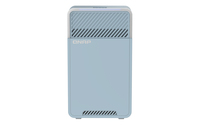
QNAP Adapter QMiro-201W - Wireless router - GigE Dual-Band
1GbE (RJ45) - 802.11a/b/g/n/ac - USB 3.2 Gen 1 - Qualcomm IPQ4019 - 512 MB DDR3 - 4 GB eMMC - 4 MB SPI NOR Flash - 68 x 100 x 175.5 mm
Brand: QNAP
SKU: QMIRO-201W
AED923.58
Price excl. VAT
AED969.76
Price incl. VAT
Low stock — only 1 left

Do you have any question about this product? Click here to contact our pre-sales consultant and make the right purchase.
تسوّق بثقة: مخزون حقيقي وشروط تجارة عادلة
أسعار أفضل مع توفّر دقيق للمخزون، ومدفوعات آمنة بشفافية كاملة.
- مخزون مباشر مجمّع: التوفّر المعروض هو إجمالي المخزون المجمّع لمستودعاتنا وموزّعينا الشركاء، ويتم تحديثه لحظة بلحظة. إذا كان المنتج متوفراً، فهو متوفر فعلاً.
- لا خصم قبل التأكيد: يتم حجز المبلغ فقط عند إتمام الطلب، ولا يُخصم إلا بعد تأمين المنتج لك.
- إلغاء مجاني خلال 24 ساعة: غيّرت رأيك؟ ألغِ طلبك خلال 24 ساعة وسيتم فك حجز المبلغ بالكامل.
- نفد المخزون؟ استرداد كامل: إذا أصبح المنتج غير متوفر بعد طلبك، سنلغي الطلب ونفك حجز مبلغك أو نستردّه بنسبة 100%.
- توصيل إلى باب بيتك في الإمارات: يتم فحص كل طلب وتغليفه في مستودعاتنا وشحنه عبر DHL Express أو UPS أو FedEx بنظام DDP – دون أي رسوم جمركية أو ضرائب عليك. لا رسوم خفية.
- شروط عادلة للإلغاء والإرجاع: في حال الإلغاء المتأخر أو إرجاع المنتجات الغالية أو المطلوبة خصيصاً دون وجود عيب، قد تُطبَّق رسوم تتراوح بين 5% و10%، تغطي فقط تكاليف الشحن والمناولة الفعلية حتى نتمكن من الاستمرار. لا تُفرض أي رسوم على المنتجات المعيبة وحالات الإرجاع للضمان (RMA). لا رسوم تأخير في السداد ولا فوائد إطلاقاً. الشروط الكاملة
 NOTE: The information below is provided for your convenience only; the accuracy of the specifications cannot be guaranteed. However, if necessary, please check with us before purchasing. Data provided by 1 World Sync.
General
WAN connection type
RJ-45
Wi-Fi band
Dual-band (2.4 GHz / 5 GHz)
Top Wi-Fi standard
Wi-Fi 5 (802.11ac)
WLAN data transfer rate (max)
1733 Mbit/s
Ethernet LAN
Y
Ethernet LAN interface type
Gigabit Ethernet
Ethernet LAN data rates
10,100,1000 Mbit/s
Cabling technology
10/100/1000Base-T(X)
Mobile network generation
4G
Product type
Tabletop router
Product colour
Blue
QNAP QMiro-201W. WAN connection type: RJ-45. Wi-Fi band: Dual-band (2.4 GHz / 5 GHz), Top Wi-Fi standard: Wi-Fi 5 (802.11ac), WLAN data transfer rate (max): 1733 Mbit/s. Ethernet LAN interface type: Gigabit Ethernet, Ethernet LAN data rates: 10,100,1000 Mbit/s, Cabling technology: 10/100/1000Base-T(X). Mobile network generation: 4G. Product type: Tabletop router, Product colour: Blue
| Estimate Gross Weight | 0.761 |
|---|
https://www.qnap.com/en/product/qmiro-201w
Next-Generation Tri-Band Mesh Wi-Fi SD-WAN Router
To embrace the new normal of remote working, businesses must deploy both a remote VPN that is quickly accessible by multi-location users, and a high-speed in-premises solution covering wired and wireless connections. The QMiro-201W supports tri-band Mesh Wi-Fi 5 and an enterprise-grade SD-WAN VPN solution to enable multi-site VPN deployment via the QuWAN Orchestrator. Combined with a budget-friendly price, the QMiro-201W is a solid foundation for building next-generation networks.
Connect your Home with High-Coverage Tri-Band Mesh Wi-Fi
Say goodbye to weak Wi-Fi signals by setting up a Mesh Wi-Fi structure in your home. QMiro-201W adopts Wi-Fi Handover technology, allowing multiple users to be automatically connected to the router with the strongest Wi-Fi signal with a single SSID. With dual-band 2.4GHz/5GHz, QMiro-201W provides a dedicated Mesh 5GHz frequency for high-bandwidth connections between Mesh Wi-Fi routers, guaranteeing smooth and stable Wi-Fi connections.
Dedicated Tri-band Mesh Wi-Fi for Smooth Connections
The QMiro-201W supports tri-band Wi-Fi of 2.4GHz, 5GHz and a dedicated Mesh Wi-Fi 5GHz band for high-bandwidth connections between Mesh Wi-Fi routers. Unlike conventional dual-band routers whose 5GHz band must be shared between Wi-Fi clients and Mesh Wi-Fi routers, the QMiro-201W guarantees smooth and stable Wi-Fi connections.
QuRouter OS: User-Friendly Router Management
With a web-based GUI and at-a-glance dashboard, the QuRouter OS provides a user-friendly interface for everyday network management. The QMiro-201W also supports wireless router or AP mode configuration via the QuRouter OS, allowing dispatching an IP address as a master router or receiving an IP address from another main router. With the QuRouter OS, not only can users efficiently manage all connected wired and wireless devices in real-time, but they can also configure NAT, VPN, security and QuWAN advanced functions.
Convenient connectivity for remote workers
Working from home has transformed the lives and daily practices of workers and businesses alike, but now the challenge is ensuring that we are always securely connected to business IT. QNAP QuWAN is a SD-WAN solution that enables automatic Mesh VPN topology from corporate networks to personal home routers. Once your home QMiro-201W is set up, QuWAN Cloud Orchestrator enables QMiro-201W to connect to the mesh VPN whether in router mode or AP mode. After that, your QMiro-201W is your gateway to the company cloud.
Create a family-friendly internet environment
Parental controls are included for you to block inappropriate sites, set up screen time, and filter keywords on search engines to ensure that everyone in your family can use the internet safely.
Protect yourself from breaches and intrusion
QNAP follows the Zero Trust ("never trust, always verify") security model, helping to protect you from malware and intrusion. Connections, devices, and IP addresses can also be blocked using the NAT.
Stylish Morandi blue and fanless design for homes
Combining style and functionality to fit modern digital homes, the QMiro-201WΓÇÖs design includes Morandi colors and near-silent fanless cooling.
Easy 6-Step Installation with the QuRouter App
Network settings are greatly simplified with the QuRouter App. With Bluetooth and a Settings Wizard you are only six steps away from setting up your smart home network and cloud storage applications.
Install your device
Open the QuRouter App to check device model name, connect to power and the internet.
Verify your device
Enter the last 6 characters of the MAC address from the sticker on the device to complete verification.
Select your device location
Select the device location at certain area of your home.
Set up wireless network
Change the Wi-Fi SSID and password to connect to wireless network.
Firmware update notification
Users will be notified with the new firmware version for quick updates.
Log in with your QNAP ID
Log in with your QNAP ID to register the device.
- Tri-Band Wi-Fi guarantees smooth and stable Wi-Fi connections via 2.4GHz, 5GHz and dedicated Mesh 5GHz frequencies
- Supports Mesh Wi-Fi Handover for wide-range connectivity
- Easily and securely connect to your company networks and multi-site VPN using the built-in QNAP SD-WAN solution, QuWAN
0.0
0 review(s)
Our warehouse · Our shipments · Inside our operation
Photographed in our warehouse, not pulled from a stock library.
A look at the technology we receive, check, pack and dispatch every day. These are our own photos from day-to-day operations.