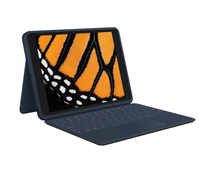
Logitech Rugged Combo 3 Touch for Education
Logitech Rugged Combo 3 Touch for Education - Keyboard and folio case - with trackpad - Apple Smart connector - QWERTY - Pan Nordic - academic - for Apple 10.2-inch iPad (7th generation, 8th generation, 9th generation)
Brand: Logitech
SKU: 920-010366
AED879.54
Price excl. VAT
AED1,055.45
Price incl. VAT
Available – In Stock

Do you have any question about this product? Click here to contact our pre-sales consultant and make the right purchase.
تسوّق بثقة: مخزون حقيقي وشروط تجارة عادلة
أسعار أفضل مع توفّر دقيق للمخزون، ومدفوعات آمنة بشفافية كاملة.
- مخزون مباشر مجمّع: التوفّر المعروض هو إجمالي المخزون المجمّع لمستودعاتنا وموزّعينا الشركاء، ويتم تحديثه لحظة بلحظة. إذا كان المنتج متوفراً، فهو متوفر فعلاً.
- لا خصم قبل التأكيد: يتم حجز المبلغ فقط عند إتمام الطلب، ولا يُخصم إلا بعد تأمين المنتج لك.
- إلغاء مجاني خلال 24 ساعة: غيّرت رأيك؟ ألغِ طلبك خلال 24 ساعة وسيتم فك حجز المبلغ بالكامل.
- نفد المخزون؟ استرداد كامل: إذا أصبح المنتج غير متوفر بعد طلبك، سنلغي الطلب ونفك حجز مبلغك أو نستردّه بنسبة 100%.
- توصيل إلى باب بيتك في الإمارات: يتم فحص كل طلب وتغليفه في مستودعاتنا وشحنه عبر DHL Express أو UPS أو FedEx بنظام DDP – دون أي رسوم جمركية أو ضرائب عليك. لا رسوم خفية.
- شروط عادلة للإلغاء والإرجاع: في حال الإلغاء المتأخر أو إرجاع المنتجات الغالية أو المطلوبة خصيصاً دون وجود عيب، قد تُطبَّق رسوم تتراوح بين 5% و10%، تغطي فقط تكاليف الشحن والمناولة الفعلية حتى نتمكن من الاستمرار. لا تُفرض أي رسوم على المنتجات المعيبة وحالات الإرجاع للضمان (RMA). لا رسوم تأخير في السداد ولا فوائد إطلاقاً. الشروط الكاملة
 NOTE: The information below is provided for your convenience only; the accuracy of the specifications cannot be guaranteed. However, if necessary, please check with us before purchasing. Data provided by 1 World Sync.
General
Keyboard layout
QWERTY
Keyboard language
Nordic
Pointing device
Trackpad
Brand compatibility
Apple
Compatibility
iPad (7th, 8th & 9th gen)
Product colour
Blue
Connectivity technology
Docking
Device interface
Smart Connector
Power source
Dock
Mobile operating systems supported
iPadOS
Logitech Rugged Combo 3 Touch. Keyboard layout: QWERTY, Keyboard language: Nordic, Pointing device: Trackpad. Brand compatibility: Apple, Compatibility: iPad (7th, 8th & 9th gen), Product colour: Blue. Connectivity technology: Docking, Device interface: Smart Connector. Power source: However. Mobile operating systems supported: iPadOS
| Estimate Gross Weight | 0.677 |
|---|
https://www.logitech.com/en-gb/products/education/ipad-solutions/rugged-combo-3-touch.html
Rugged Combo 3 Touch
Protective keyboard case with trackpad
for iPad (7th, 8th & 9th gen)
BRING THE WORLD TO THEIR FINGERTIPS
Rugged Combo 3 Touch is a slim, protective keyboard case with integrated Multi-Touch trackpad for iPad (7th, 8th & 9th gen) perfect for students whether in school, at home, or wherever their project takes them. Sealed, pry-resistant keys and a durable case that exceeds MIL-STD-810g drop test standards make this the perfect tool for learning anywhere. Designed in collaboration with educators, administrators and IT specialists to bring students the best learning experience on iPad.
ONE TOOL FOR EVERY PROJECT
With five versatile use modes, students can go from the living room to the classroom and even the great outdoors with one handy tool that does it all.
View Mode: Fold back the keyboard and pull out the kickstand to watch educational videos and more.
Type Mode: Dock the keyboard upright and type out reports and assignments. Use the trackpad to navigate, edit, and create.
Sketch Mode: Adjust the iPad to a lower angle to sketch or take handwritten notes with Logitech Crayon.
Read Mode: Fold the keyboard back to read e-books, articles, and more.
Camera Mode: Once the keyboard is folded back, slide it down to expose the camera so you can take photos and videos or use augmented reality learning apps.
EFFORTLESS TYPING AND NAVIGATION WITH KEYBOARD AND TRACKPAD
Say hello to a physical, tactile typing experience that enables students to type quickly and accurately while building skills, completing assignments, and testing. With many testing agencies recommending or even requiring an external keyboard, the Rugged Combo 3 Touch is perfect for learning on iPad.
EXPRESS AND COLLABORATE WITH EASE
Essays, notes, and brainstorm sessions are easier than ever with Rugged Combo 3 Touch. Having a physical keyboard and trackpad on hand lets students get their thoughts out quickly, mockup ideas, and take notes that are easy to reference later. This comes in handy for individual studying, group work, and sharing ideas with the class.
GREAT FOR STEM LEARNING AND BEYOND
Rugged Combo 3 Touch gives students the tools to explore math and sciences on iPad like never before—whether it’s coding, calculating formulas, or bringing their theories to life outside of the classroom.
EXPLORE WITH AUGMENTED REALITY
Rugged Combo 3 Touch is perfectly fitted for iPad, allowing students to access the camera and enjoy more dynamic, immersive learning experiences. Augmented reality brings subjects like history, art, and science to life. Whether it’s x-ray vision to organisms and ecosystems, or a time portal to ancient Egypt, students have the power to interact, learn, and explore in a new way.
0.0
0 review(s)
Our warehouse · Our shipments · Inside our operation
Photographed in our warehouse, not pulled from a stock library.
A look at the technology we receive, check, pack and dispatch every day. These are our own photos from day-to-day operations.