Fluke FVF-SC2 View Forms Software+RS232IR USB f.180/1653/789/1550B 157673 4Beha
Form software with cable
Brand: Fluke
SKU: 1576734
AED0.00
Price excl. VAT
AED0.00
Price incl. VAT
Out of stock

Do you have any question about this product? Click here to contact our pre-sales consultant and make the right purchase.
تسوّق بثقة: مخزون حقيقي وشروط تجارة عادلة
أسعار أفضل مع توفّر دقيق للمخزون، ومدفوعات آمنة بشفافية كاملة.
- مخزون مباشر مجمّع: التوفّر المعروض هو إجمالي المخزون المجمّع لمستودعاتنا وموزّعينا الشركاء، ويتم تحديثه لحظة بلحظة. إذا كان المنتج متوفراً، فهو متوفر فعلاً.
- لا خصم قبل التأكيد: يتم حجز المبلغ فقط عند إتمام الطلب، ولا يُخصم إلا بعد تأمين المنتج لك.
- إلغاء مجاني خلال 24 ساعة: غيّرت رأيك؟ ألغِ طلبك خلال 24 ساعة وسيتم فك حجز المبلغ بالكامل.
- نفد المخزون؟ استرداد كامل: إذا أصبح المنتج غير متوفر بعد طلبك، سنلغي الطلب ونفك حجز مبلغك أو نستردّه بنسبة 100%.
- توصيل إلى باب بيتك في الإمارات: يتم فحص كل طلب وتغليفه في مستودعاتنا وشحنه عبر DHL Express أو UPS أو FedEx بنظام DDP – دون أي رسوم جمركية أو ضرائب عليك. لا رسوم خفية.
- شروط عادلة للإلغاء والإرجاع: في حال الإلغاء المتأخر أو إرجاع المنتجات الغالية أو المطلوبة خصيصاً دون وجود عيب، قد تُطبَّق رسوم تتراوح بين 5% و10%، تغطي فقط تكاليف الشحن والمناولة الفعلية حتى نتمكن من الاستمرار. لا تُفرض أي رسوم على المنتجات المعيبة وحالات الإرجاع للضمان (RMA). لا رسوم تأخير في السداد ولا فوائد إطلاقاً. الشروط الكاملة
 NOTE: The information below is provided for your convenience only; the accuracy of the specifications cannot be guaranteed. However, if necessary, please check with us before purchasing. Data provided by 1 World Sync.
General
Minimum RAM
32 MB
Minimum storage drive space
70 GB
Compatible operating systems
Windows 2000, Windows XP, Windows Vista or Windows 7
Fluke FlukeView. Minimum RAM: 32 MB, Minimum storage drive space: 70 GB. Compatible operating systems: Windows 2000, Windows XP, Windows Vista or Windows 7
https://www.fluke.com/en-us/product/accessories/software/fluke-fvf-sc2-flukeview-forms-software#
Expand the power of the world's most rugged, accurate handheld test tools with FlukeView® Forms Documenting Software.
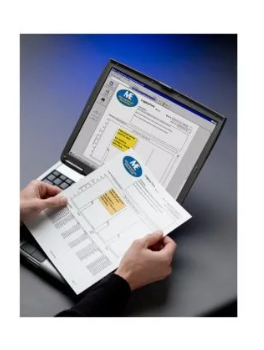
To address the increasing demands for reporting and documentation, Fluke presents FlukeView Forms documenting software. FlukeView Forms increases the power of your Fluke tool by enabling you to document, store and analyze individual readings or series of measurements, then convert them into professional-looking documents.
Several versions of the product are available, depending upon the type of cable needed to download data from your instrument and depending upon the data reporting capability you need. FlukeView Forms offers two levels of capability: FlukeView Forms Basic, and FlukeView Forms plus Designer. FlukeView Forms Basic can be used alone to download measurement data and create reports that can be saved and printed. FlukeView Forms plus Designer allows a user to edit an existing form or create a new form to customize the report to individual needs. A common edit might add a company logo and title. See the [Features] tab on this page for more information
With FlukeView® Forms documenting software, the logging capabilities of handheld test equipment can be used to solve tough problems. You can download the readings from meters into FlukeView® Forms to spot trends and document measurement data.
You can instantly review and compare data from up to 6 different metersΓÇá on the same document - providing analysis capabilities that a meter alone can't provide.
FlukeView® Forms comes with an array of standard analysis and reporting forms that get you started on displaying your data in tables, graphs or helpful diagrams. You can leave notes on the forms to draw attention to a particular event.†
Or use the FlukeView® Forms Plus Designer† to customize your reports or add your company logo.
FlukeView® Forms communicates with supported tools fast and easily via an infrared serial interface. The software will automatically recognize your meter and transfer the data without any configuration.
Share or store your data with co-workers or clients – print forms, export to other software programs, or have co-workers and clients down load the free FlukeView® Demo/Reader to view and interact with your captured data.
Using FlukeView® Forms with Multimeters, Thermometers†, MegOhmeters and ProcessMeter™ tools
For the meters in the table below, you can measure and store hundreds of readings to the meter's internal memory, and then later download the information to FlukeView® Forms. For meters that do not have internal memory, such as the Fluke-187, Fluke-789 and the Fluke-45, you can take interactive readings while connected to your PC with FlukeView® Forms.
FlukeView® Forms also logs events to make analyzing your data easier. This unique method of data recording provides more detailed readings when the input signal changes significantly. The amount of signal change that will trigger an event can be adjusted to fit your specific test situation. The minimum, maximum and average of readings are recorded for each event. Logging sessions can also be configured so that data will be recorded over specific intervals (e.g., every 5 minutes or 30 seconds).
Using FlukeView® Forms with Fluke 1653B Installation tester†
Up to 500 test results can be stored in the Fluke 1653B installation tester. The data stored for each measurement consists of the test function, user selectable test conditions and unique references. The results can be uploaded for preparing professional reports. These reports can easily be customized to suit individual requirements as well as compliance with local regulations. Standard formats as well as localized forms for Germany (ZVEH), Austria (ÖVE) and Switzerland (electrosuisse, gem. NIV) are also available
0.0
0 review(s)
Our warehouse · Our shipments · Inside our operation
Photographed in our warehouse, not pulled from a stock library.
A look at the technology we receive, check, pack and dispatch every day. These are our own photos from day-to-day operations.